Activity tracking for every operator
Operators sign on at the sensor with a QR code. OneTrack tracks their time by function, including indirect work, breaks, lunches, idle time and downtime, with or without a WMS.
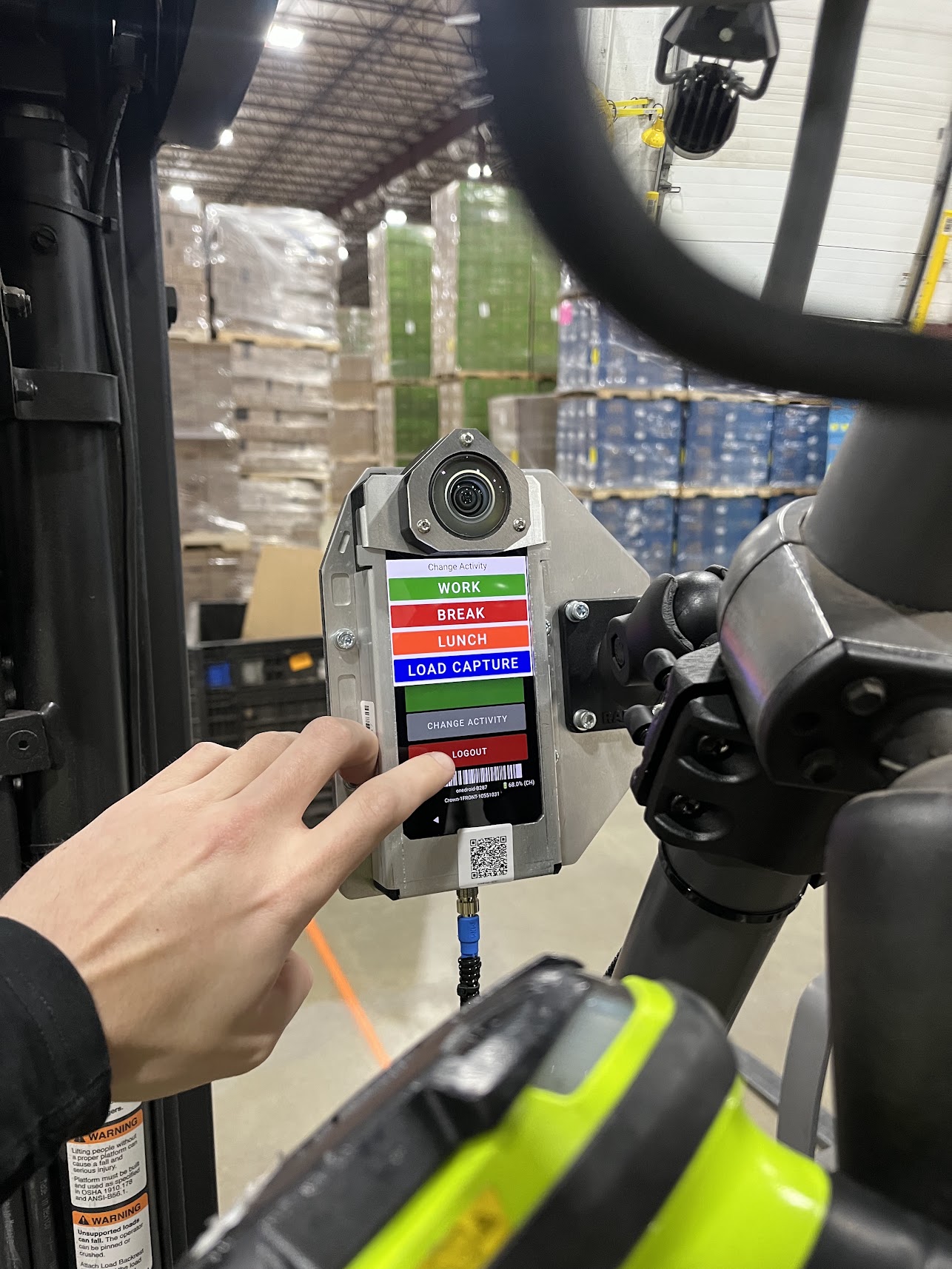
Every minute, by activity
Operators tell the sensor what they're doing. OneTrack keeps the timeline and flags what needs a look.
Sign on at the sensor
Operators scan their QR code at the sensor, choose an activity and switch with a tap. No badge readers, no separate app.

- 01Scan your QR code at the sensor
- 02Choose what you're doing
- 03Switch with a tap when the work changes
Time by function, including indirect work
Picking, replenishment, battery changes, cleanup and any code you add, for every operator, shift and site.
Breaks and lunches, checked for you
Breaks that run long go to the supervisor with the clip, and the operator sees it on the sensor.
Idle time and downtime
See when a lift sat parked between tasks, and when it was down, with the clip to show why.
Works without a WMS
Start with no integration. Connect the WMS later for units per hour and gap time between transactions.
OneTrack as your labor management system
Church & Dwight saves 120+ hours a week on breaks
“We were losing 120 hours a week just on extended breaks. Now, OneTrack flags violations and sends them directly to supervisors. That alone pays for OneTrack.”
Common questions
What is gap time in a warehouse?
Gap time is the time between productive transactions, such as WMS scans, picks and putaways, when an operator may be idle, on an extended break or held up by the process. OneTrack measures it automatically and flags the gaps worth a look, with video, so supervisors can coach on what actually happened.
How does OneTrack track operator activities without a WMS?
Operators sign on by scanning their QR code at the OneTrack sensor, then choose an activity code, such as work, break, lunch or battery change, on the sensor's screen. Supervisors see how time is spent without a WMS or LMS integration.
How much time do warehouses lose to extended breaks and lunches?
It varies by site, and most sites only find out once they measure it. Church & Dwight was losing 120 hours a week to extended breaks. With OneTrack flagging each one to supervisors, the site now saves more than 120 hours a week and $287K a year.
Can OneTrack integrate with my WMS for activity tracking?
Yes. OneTrack connects to your WMS so each transaction sits beside the video, and you can see why a task took too long: travel, a process problem or idle time. Without a WMS, operators sign on at the sensor with a QR code and you start tracking on day one.
Stay ahead of the curve
Warehouse productivity, gap time and AI for operations, in your inbox.
No spam, ever. Unsubscribe any time.
Thanks for subscribing
You'll hear from us soon. Check your inbox, and your spam folder just in case.
See where every minute goes.
A 30-minute call. We'll show you how your time breaks down.